11. Februar 2025
Red Ink: The alternative AI office assistant for existing APIs
- AI assistant for Microsoft Office
- Runs on your existing LLM
- Rich in features, low in cost
Red Ink is an AI add-in for Word, Excel and Outlook that we developed for our own use to keep our data under control, to save money and because other solutions out there could not do what we wanted. Due to demand, we are now making the Windows tool available to everyone free of charge. Unlike other offerings, companies can use it with their existing language models (such as OpenAI, Microsoft and Google).
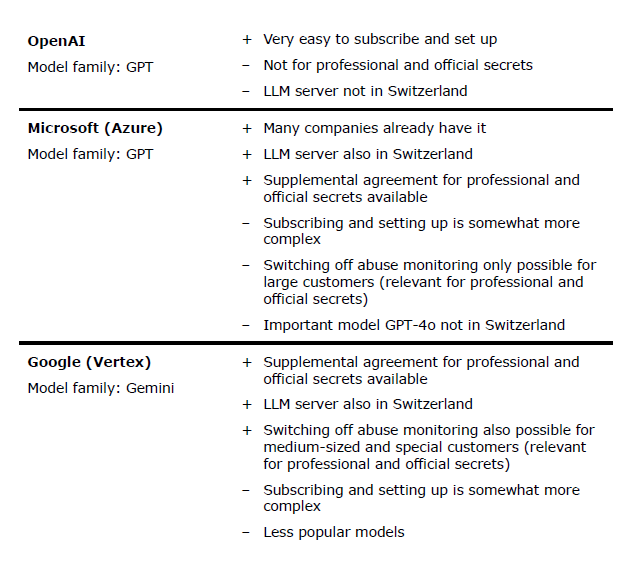
As a Swiss business law firm, we are bound by the requirements of professional secrecy. This made the use of AI a challenge because most providers of large language models were unable or unwilling to offer us the necessary data protection. OpenAI doesn't even have its servers in Switzerland, Microsoft refused to allow us to opt out of abuse monitoring and for various reasons operating a model ourselves was out of the question, at least in the short term. Ultimately, we were the first Swiss law firm to conclude a contract with Google that fulfilled all the requirements for using AI with all our data. We believe this flexibility is necessary to really benefit from the possibilities of AI. That was the first game changer for us.
The appetite came with eating
To enable our people to use language models in their everyday work, we developed a suitable add-in for Word, Excel and Outlook and later also for Edge and Chrome browsers. Initially, the tool could only translate, correct and summarise texts in Word but over time, more and more functions were added. As we had the programming capacity in-house (I programmed the tool in my spare time), we were able to implement feature requests within days. That was the second game changer.
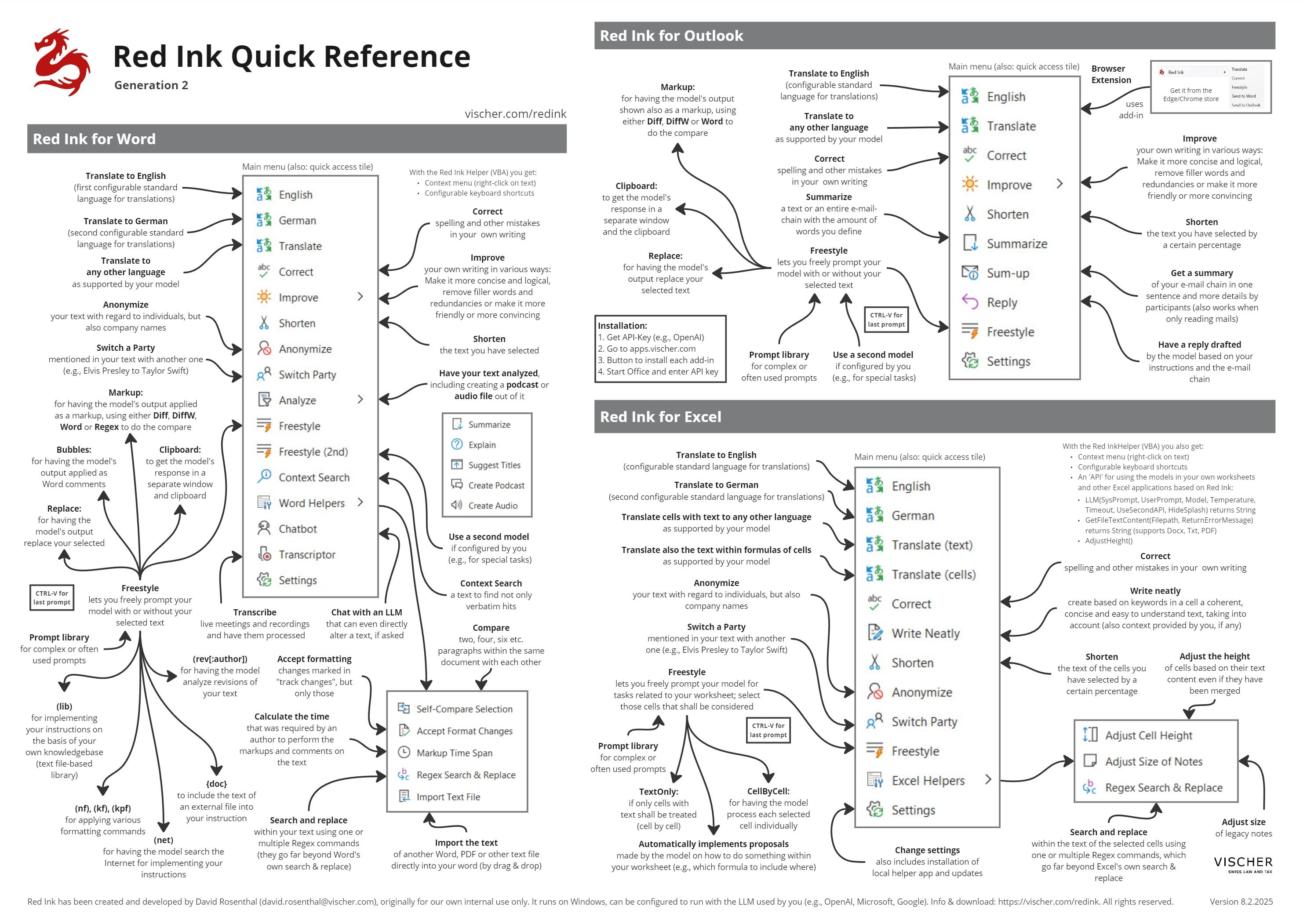
The tool, which is now called Red Ink (incidentally, we had to change the original internal name of the tool due to an intervention by Microsoft...), now has some 10,000 lines of code and can do a lot more compared to its modest beginnings. For example, it now not only rewrites texts, but can also comment on them with Word bubbles, it can analyse markups as such, it has a built-in chatbot that – unlike others – can also edit texts directly ("Agentic AI"), and it can generate podcasts (in the style of "NotebookLM") and audiobooks from existing texts directly from Word with just a few clicks, even in German (only possible with Google).
It also summarises e-mail chains and formulates suitable responses, it can fill out Excel forms or anonymise tables, and it can transcribe videos and conversations (with "Whisper" or "Vosk", both open-source models). We have also built in various little helper functions for everyday use that we have always wanted, such as a direct PDF import, comparing paragraphs or accepting all format changes. Finally, we have also built an extension for browsers so that Red Ink's functions can also be used there – for example to analyse the content of a website or a PDF.
[vimeo:1055210765]
Source code is open, free choice of models
In contrast to several other solutions in this area, Red Ink's source code is openly available on GitHub so that everyone can check it. In addition to the usual Microsoft tools, we only use well-known open-source libraries. Unlike many commercial products, Red Ink can be configured for any language model. It directly accesses the corresponding programming interfaces (so-called API), which means that it is much easier to control what happens with the input and output. This sets it apart from solutions such as "ChatGPT" or "Copilot". Anyone who does not trust the large cloud providers can also configure the tool for their local model and operate it in a protected environment.
The direct use of such APIs also has the advantage that, in our experience, of being much more cost effective. While some commercial services cost CHF/€ 15 - 30 per person per month, for our entire law firm we currently pay nowhere near as much as a single monthly subscription would cost in API fees, even though we use the latest models. Of course, we continue to use other services where they, for certain things, are better or more suitable. However, most of them are not freely usable for us because of their data law restrictions.
Incidentally, the Excel add-in also has its own API that allows other applications to utilise its AI functions. For example, we have implemented another tool, the "Red Ink Analyzer", which can analyse contract texts or data protection declarations for criteria defined by us or review or evaluate large volumes of texts for specific content with the help of AI.
Red Ink now available for everyone for free
Due to popular demand, we are now making Red Ink available to everyone. In the current beta test phase of Generation 2 of the tool, it will be free for everyone. We will have to consider how we will proceed after this phase. However, the tool will in all likelihood continue to be free of charge for personal use, and even for larger installations, should there be any interest, we assume that the costs will be significantly lower than for other solutions. We want Red Ink to be lower cost than the usual commercial solutions even when taking into account the costs for API access. Also, even though the development efforts were and are significant, we are not a software company, but still a Swiss commercial law firm, albeit with a strong practice in data, AI and tech law.
Private users can also use Red Ink. For example, if you have an account with ChatGPT, you can easily set up your personal API access. Although there are usage-based fees, these are, in our experience, negligible in most cases. All that is required during installation is a so-called API key, a kind of secret access key that must be entered in the add-in after installation. The functions can then be accessed after starting Word, Excel and Outlook.
Further information and download
The add-ins can be installed via the website https://apps.vischer.com– simply click on the buttons (updates are also carried out via the website). Another option is to install via the installation package on the same website. Technically, the newer versions of Windows, Excel and Outlook are supported, but not the "new" Outlook, as this add-in only has limited support. Due to restrictions, it unfortunately does not run on MacOS or the Office versions on the Mac.
The add-in for Edge and Chrome is available in the respective browser extension stores from Microsoft and Google. Detailed instructions in German and English are also available on the website; the tool itself is in English but works with every language supported by the respective language model. After all, Red Ink is only as good and as fast as your AI model. We use Gemini 1.5 Pro and gpt-4o, which both work fine. We are still working on making the tool available via the Windows Store. However, it is still a test version and will have bugs that need to be identified, despite internal and external tests. We look forward to receiving feedback so that we can further improve the software for all of us.
More information about Red Ink can be found at https://vischer.com/redink.
Enthaltene Dienstleistung(en):
Nehmen Sie Kontakt mit unseren Autorinnen und Autoren auf und profitieren Sie von deren Expertise:

David Rosenthal
david.rosenthal@vischer.com
+41 58 211 36 05